A second product video usually starts with the same notes as the first. The light. The colours. The pace. Then the file is downloaded from a chat and uploaded into a generator, and the next shot waits until the last one has finished. The slow part is that repeat, not the idea.
Topview Bot is a creative teammate inside the Board for that repeat. It is not a video model, and it does not claim a new physics engine. The page lists the jobs it can take. A generated clip is still a new picture. It is not a film of the shop, and it is not a sales figure.
What it keeps, and what you still say
A Topview Bot remembers preferences such as lighting, colour, and pacing, so the next job does not open on a blank description of the same style. It can bring those preferences from ChatGPT, from Claude, or from a Board you already use. You can also say the style in your own words. Read what it kept. A look saved for a dark launch will miss a bright daytime demo.
On the Board, the conversation and the generation stay in one place. You can plan shots, find references, create assets, and ask the Bot to look at a result, without downloading a file from one tool just to upload it to another. A supported asset can go into the next task. You still decide whether the shot is the one to send.
Two ways the brief gets in
One way is a sentence. You tell it what you are making and how you like it to look. The page’s own example of a remembered note is low-key light, cool tones, and a little film grain. That is a preference. It is not a guess the Bot makes from the word “campaign.”
The other way is a brief that already exists. Bring it from ChatGPT or Claude, or let the Bot learn it from a Board you trust. The move does not mean retyping the style. It does mean checking the import. A note that was right for last month’s film can be wrong for this week’s product.
If you can picture a shot and cannot find a frame, describe it in ordinary language. The Bot searches the film references it can reach, and it can also look through image results and Pinterest. Which sources come back depends on the task and on how the product is set. Use the frame as a reference for the look. Leave it out of the post. It is not a licence to republish the film.
Memory, a Skill, and more than one Bot
Memory is the look and the working habits. A Skill is a sequence you want to run again, such as finding references, planning shots, and producing assets. The page does not ship a finished skill for your brand. You save the steps you actually repeat, and you can run them on the next project instead of writing the instructions from scratch.
One chat that writes the script, writes the picture notes, and sorts the files gets hard to read. The page splits those jobs. A Story Bot can outline an episode while a Director Bot plans shots and an Organizer Bot groups the assets. Supported shots can generate at the same time, when the model and the account allow it. One of the parallel queues on the page is marked as a demo. Overlap is the point. The review still happens.
Each Bot runs in its own cloud environment and can take supported tasks beyond a fixed shortcut. Separate chats can stay separate inside one Board, and still share the project context where that applies.
Where the workspace sits
Topview is the workspace you open for the video itself. You describe an idea or add a script, a reference video, or a product URL. It plans scenes, selects models, generates assets, and keeps the shots editable on Canvas. The Bot is the teammate inside the Board. You reach it from the homepage, from a Bot conversation on the Board, or from the floating assistant while a shot is already underway. The product URL becomes a video. It does not publish the client’s page.
The Bot page does not print a separate price for the Bot. The cost of a generated second sits with the model you run, and with the plan. This article does not borrow another product’s rate and call it the Bot’s.
The jobs the page names
A product campaign that already has a style. Find visual references, plan a few concepts, and reuse the look you saved. One request the page shows is to find cinematic references for a product and plan three concepts from that saved style. That line is the page’s sample. It is not a campaign measured here. The product in the shot has to be one you may show.
A multi-episode story, split across outlines, shot planning, and a Board that stays sorted. A short film that starts from cinematic preferences you already saved. A team whose references, storyboards, and finished shots need to be grouped by scene, by stage, or by purpose. You still check that this client’s files did not land in another pile.
What you can hand a colleague
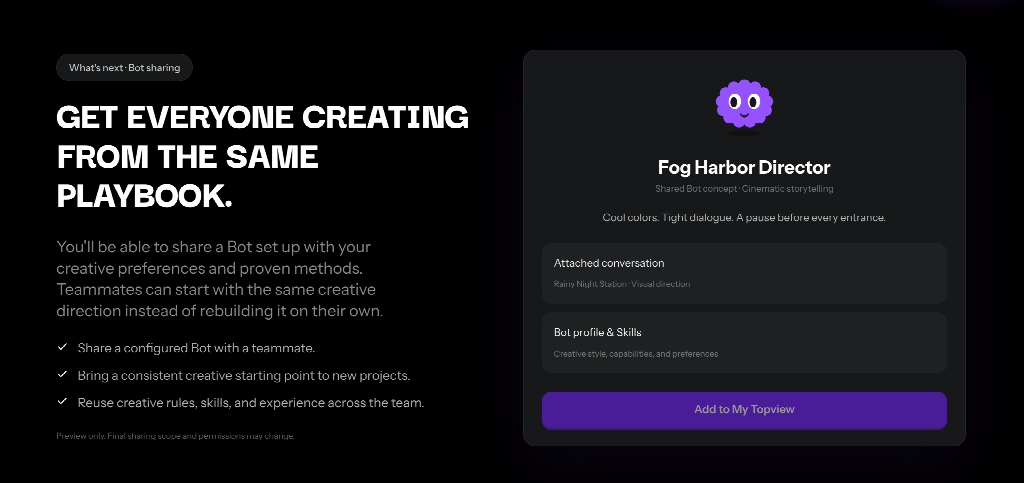
The page says you will be able to share a Bot that already has the preferences, the skills, and the methods. A teammate would start from that setup instead of from an empty chat. Sharing is marked as a preview. What travels with the Bot, who can open it, and when it is finished can still change. Until then, the written brief is what the next person needs.
A short start
Open the Bot from the homepage, switch to a Bot conversation in the Board, or use the floating assistant.
Tell it what this video is, give the visual preferences, or bring them from ChatGPT, Claude, or a Board you trust.
Ask for references, a storyboard, the assets, a Board that has been grouped, or work split across more than one Bot. Watch the result before it goes out.
What does the Bot remember? Lighting, colour, pacing, and other creative habits you set or import. It does not remember a style you never gave it.
Does it generate the video by itself? No. It works inside the Board, next to the generation. The model is a separate choice.
Can two people open the same Bot today? The page marks sharing as a preview. Scope, permissions, and timing can still change.