If you tried loading Spotify in your browser on 5 August and got nothing but a spinning wheel, you weren’t imagining it. A brief outage that week hit the web player harder than the app, and it’s a good reminder of what the browser version can and can’t do. Here’s the full, updated guide.
If you want to access music instantly without downloading any app, the Spotify Web Player is still the fastest and most convenient way in. You can open it directly in your browser and start streaming within seconds. Just visit the official Spotify web player page, log in with your account, and you’re listening, no software required. That makes it ideal for work computers, shared devices, or any situation where storage space is tight.
The biggest advantage of the web player is how it works everywhere. Whether you’re on a laptop, desktop, tablet, or a mobile browser, you can pick up your music without missing a beat. There’s nothing to update and nothing to install, which is exactly why it remains a go-to option for anyone who values speed over extra features.
Today’s Update: What Web Player Users Should Know Right Now
Spotify just posted its Q2 2026 results, and the numbers explain why so many people rely on this platform daily. The company reported 300 million Premium subscribers for the first time in its history, alongside 777 million total monthly active users. It’s a milestone Spotify itself called one no audio streaming service has ever reached, and it lands in the same year the company is marking its 20th anniversary.
That scale also means outages get noticed fast. On 5 August 2026, Spotify suffered a short but widespread outage, with reports spiking on Downdetector across major cities. Users found the browser version was hit hardest, while the mobile and desktop apps stayed usable, though sluggish. The issue cleared within a few hours, but it’s worth knowing: if the web player won’t load, the app is usually your faster fallback.
The lossless audio gap on web player
Spotify’s Lossless audio feature, streaming FLAC files up to 24-bit/44.1kHz, is now fully live across Individual, Duo, and Family Premium plans on desktop and mobile apps. It is not available through the web player, which stays capped at AAC 256kbps for Premium accounts and 128kbps for Free accounts. If high-fidelity sound matters to you, the desktop or mobile app is still the only way to get it.
What Is Spotify Web Player and How Does It Work
The Spotify Web Player is a browser-based version of Spotify that lets you stream music directly online without installing the app. It runs on modern browsers like Chrome, Edge, Firefox, and Safari, and gives you access to Spotify’s full library, including playlists, albums, podcasts, and personalised recommendations. All you need is a Spotify account and a stable internet connection.
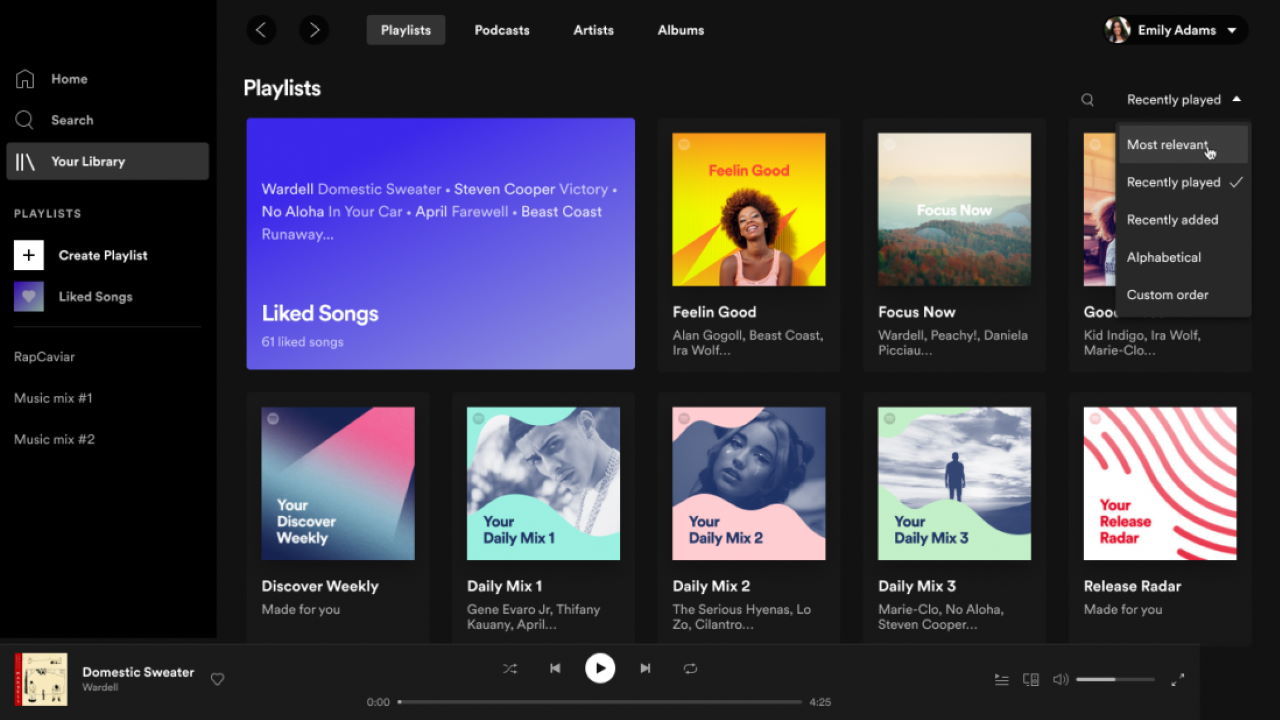
Once you log in, the interface looks close enough to the desktop app that new users find their way around quickly. You can search for songs, build playlists, browse trending music, and manage your library without any real limitations. It’s especially useful if you switch between devices often, since your listening history and preferences sync in real time.
How to Login to Spotify Web Player (Step-by-Step Guide)
Getting started takes only a few steps. Open your preferred browser and go to the official Spotify web player page. You’ll see a login option where you can enter your email and password, or continue with Google, Apple, or Facebook. New to Spotify? Setting up an account takes less than a minute.
After logging in, you land on the main dashboard with your playlists, recently played tracks, and recommendations already there. From there you can search for any song or artist, hit play instantly, and shape your listening experience. The whole process is smooth enough for beginners and seasoned users alike.
Is Spotify Web Player Free or Paid? (Free vs Premium Explained)

The web player works with both free and Premium accounts, so you have flexibility depending on what you need. On the free tier, you get the full music library and on-demand playback without any subscription cost, though you’ll hear occasional ads and get somewhat less control over playback, capped at 128kbps AAC.
With Spotify Premium, you get an ad-free experience, unlimited skips, and better playback control, with audio streaming up to 256kbps AAC in the browser. That’s a step up from Free, but still short of the Lossless quality Premium unlocks on the desktop and mobile apps. For everyday listening the web player covers you well; for critical listening, reach for the app.
Key Features of Spotify Web Player That Make It Popular
Part of the web player’s popularity comes from how closely it matches the desktop app’s feature set. You get millions of songs, full playlist management, and personalised recommendations based on your listening habits. Features like Discover Weekly and Daily Mix help you find new music without digging for it yourself.
Cross-device continuity is another strong point. Start a track on your phone and pick it up in your browser without losing your place. The web player also includes queue management, search filters, and podcast streaming, and it holds up reasonably well even on slower connections.
Spotify Web Player vs App – Which One Is Better
Which one suits you depends on what you actually need. The web player is ideal if you want quick access without installing anything, especially in restricted environments like offices or schools. It’s convenient and flexible, with no storage space or update prompts to worry about.
The app, on the other hand, adds offline downloads, Lossless audio, and more advanced playback controls, including the equalizer and AI DJ. If you listen regularly and care about sound quality, the app is the better long-term choice. For quick, occasional listening, the web player still gets the job done.
Common Spotify Web Player Issues and How to Fix Them
The web player is generally reliable, but you may run into playback errors, login problems, or pages that won’t load. Most of these trace back to browser settings, outdated software, or network restrictions, and August’s outage was a reminder that the browser version tends to be the first thing affected when something goes wrong on Spotify’s end.
To fix common problems, clear your browser cache and cookies, disable extensions like ad blockers, and make sure JavaScript is enabled. Switching browsers or updating your current one often resolves compatibility issues. If a problem persists and the app is working fine on your phone or desktop, that’s a strong sign the issue sits with your browser rather than your account.
Why Spotify Web Player Is Still Relevant in 2026
Even with strong app alternatives, the web player remains genuinely useful because of how accessible it is. As more people lean on cloud-based tools, browser-based streaming keeps gaining ground since it skips installations entirely and works from almost anywhere.
With Spotify marking its 20th year and crossing 300 million Premium subscribers, the platform’s focus on frictionless, cross-device listening has only sharpened. The web player fits neatly into that picture: no download, no setup, just a login and your library, even if the audiophiles among us will still want the app for Lossless.
FAQs About Spotify Web Player
1. How do I open Spotify Web Player? Visit the official Spotify website and select the web player option. After logging in, you can start listening instantly without downloading anything.
2. Can I use Spotify Web Player without a Premium account? Yes. The web player works with a free account, but it includes ads and caps audio quality at 128kbps, compared with 256kbps on Premium.
3. Does Spotify Web Player support Lossless audio? No. Lossless streaming is only available through the Spotify desktop and mobile apps, even on a Premium account.
4. Does Spotify Web Player work on mobile browsers? Yes, though the experience is slightly simplified compared with desktop.
5. Why is Spotify Web Player not working? Common causes include browser issues, disabled JavaScript, network restrictions, or a Spotify-side outage. Clearing your cache and checking whether the app works elsewhere usually points you to the answer.
6. Is Spotify Web Player safe to use? Yes, as long as you access it through the official Spotify website, it’s completely secure for streaming music online.
Final Thoughts on Spotify Web Player
The Spotify Web Player remains one of the easiest ways to listen to music online without installing anything. Its browser-based design, combined with a strong feature set, suits a wide range of users, whether you’re working, studying, or just relaxing.
As Spotify pushes further into 2026 off the back of its 300-million-subscriber milestone, the web player’s role as the fastest, lightest way in isn’t going anywhere. Know its one real limit, no Lossless audio, and it’ll serve you well for almost everything else.
You may also read:
Lincoln Eastern Bypass: Full Project Guide, Route Map, and Latest Updates
Tennants Auctioneers