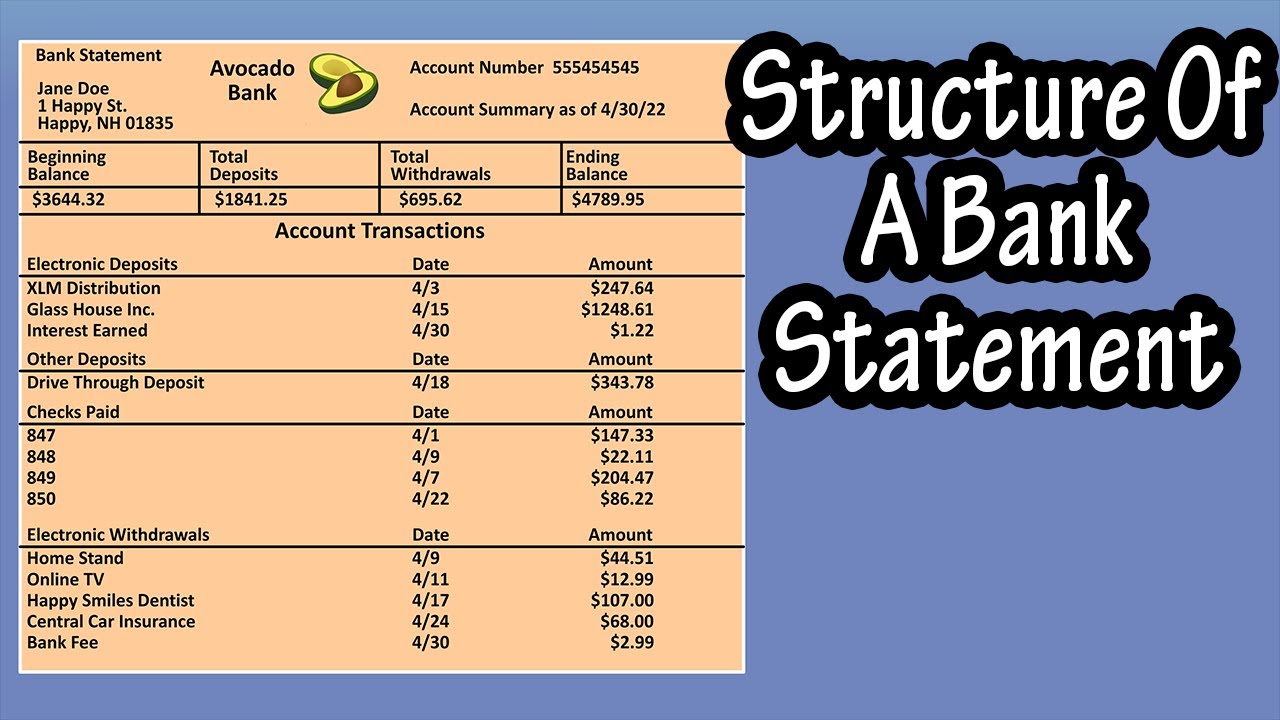
If you have ever needed to submit financial proof for a mortgage, verify your income for a rental agreement, or reconcile your monthly budget, you have likely asked: What does a bank statement look like?
A bank statement is a formal, legally binding document issued by a financial institution that outlines all monetary activity within a specific account over a defined monthly cycle. While bank statements might initially seem like complicated grids of numbers, abbreviations, and codes, their layout follows a standardized format across almost all commercial banks, credit unions, and digital neobanks.
This comprehensive guide breaks down the visual layout of a standard bank statement, explains every section step-by-step, deciphers complex transaction codes, compares paper versus electronic formats (e-Statements), and offers practical tips for spot-checking fraudulent activity.
Anatomy of a Bank Statement: Visual Overview
To understand What Does a Bank Statement Looks Like in practice, it helps to view it as a structured single- or multi-page report divided into five distinct operational zones. Below is a detailed breakdown representing a standard statement layout from major financial institutions such as Chase, Bank of America, Wells Fargo, or Citibank.
Plaintext
====================================================================================
                       DIAGRAM: STANDARD MONTHLY BANK STATEMENT LAYOUT
====================================================================================
[ ZONE 1: BANK BRANDING & HEADER ]                  [ ZONE 2: ACCOUNT SUMMARY BOX ]
----------------------------------                  -------------------------------
• Bank Logo & Official Contact Info                 • Beginning Balance:   $5,240.00
• Customer Legal Name & Address                     • Total Deposits (+):  $3,500.00
• Account Number (Masked: XXXX-4321)                 • Total Withdrawals (-):$2,100.00
• Statement Period (e.g., Oct 01 - Oct 31)           • Total Fees (-):        $12.00
                                                    • Ending Balance:      $6,628.00
------------------------------------------------------------------------------------
[ ZONE 3: DETAILED TRANSACTION LEDGER (ITEMIZED ACTIVITY) ]
------------------------------------------------------------------------------------
Date     | Description / Transaction Type          | Amount ($)     | Running Balance
------------------------------------------------------------------------------------
Oct 03   | DIRECT DEPOSIT - TECH CORP PAYROLL      | +$1,750.00     | $6,990.00
Oct 05   | POS PURCHASE - WHOLE FOODS MARKET       | -$142.50       | $6,847.50
Oct 12   | ACH WITHDRAWAL - ELECTRIC UTILITY CO    | -$95.00        | $6,752.50
Oct 20   | ATM WITHDRAWAL - MAIN ST BRANCH #04     | -$100.00       | $6,652.50
------------------------------------------------------------------------------------
[ ZONE 4: FEE SCHEDULE & INTEREST EARNED ]         [ ZONE 5: DISCLOSURES & NOTICES ]
------------------------------------------         ---------------------------------
• Monthly Service Fee: $12.00                      • FDIC Insurance Disclosures
• Interest APY Earned: 0.05% ($0.28)               • Error Dispute Instructions
====================================================================================
The 5 Essential Sections of a Bank Statement Explained
Every official bank statement—whether printed on paper or downloaded as a secure PDF—contains five core structural elements:
1. Header and Account Identification Zone
Located at the top of the document, this section identifies both the financial institution and the account holder. It includes:
- Bank Information: Official logo, customer service phone number, mailing address, and website URL.
- Customer Information: Full legal name and registered residential or mailing address.
- Account Details: Account type (e.g., Checking, Savings, Money Market) and the account number (usually masked for security, showing only the final four digits, e.g.,
XXXX-XXXX-4321). - Statement Cycle/Period: The specific timeframe covered, typically 28 to 31 days (e.g., “October 1, 2026 to October 31, 2026”).
2. Account Summary Block
Positioned prominently near the top right or center, the summary block acts as an executive overview of your finances for that month. It displays a simple mathematical calculation of your funds:
Beginning Balance + Total Deposits – Total Withdrawals – Fees Charged = Ending Balance
3. Itemized Transaction Ledger
This is the largest portion of the document. It logs every transaction in chronological order. Each row on the ledger contains four critical columns:
- Transaction Date: The exact date the transaction was settled/posted to your account.
- Description: The merchant name, employer payroll details, transfer notes, or transaction channel.
- Amount: Listed as a credit (incoming funds, often displayed with a plus sign or in a separate “Deposits” column) or debit (outgoing funds, displayed with a minus sign or in a “Withdrawals” column).
- Running Balance: The total funds remaining in your account immediately after that specific transaction posted.
4. Fee Schedule and Interest Summary
Banks are legally required to isolate and disclose all fees assessed during the cycle. This section highlights monthly service charges, out-of-network ATM fees, wire transfer charges, or overdraft penalties. If the account earns interest (such as a High-Yield Savings Account), this area details the Interest Earned Year-to-Date (YTD) and Annual Percentage Yield (APY).
5. Legal Disclosures and Error Resolution Rights
Found on the final page or back of the statement, this fine print outlines your legal rights under federal banking regulations (such as Regulation E in the United States). It provides clear instructions on how to dispute an incorrect charge, report lost or stolen debit cards, and contact the bank’s fraud investigation unit.
Understanding Common Bank Statement Codes and Abbreviations
When reviewing a statement, you will frequently run into shorthand abbreviations. Understanding these codes is key to reading your statement accurately:
| Abbreviation | Full Term | Meaning / Description |
|---|---|---|
| ACH | Automated Clearing House | Electronic bank-to-bank transfer (e.g., direct deposit payroll or automatic bill payments). |
| POS | Point of Sale | Debit card transaction executed at a physical store or online checkout merchant. |
| ATM | Automated Teller Machine | Cash deposit, withdrawal, or balance inquiry completed at an automated terminal. |
| INT | Interest Credited | Interest income added to your account balance by the bank. |
| NSF | Non-Sufficient Funds | A penalty fee assessed when a transaction exceeds your available balance. |
| OD / OVD | Overdraft Fee | A charge incurred when the bank covers a payment on your behalf while balance is zero/negative. |
| CR / DR | Credit / Debit | CR indicates money added into the account; DR indicates money deducted. |
Paper Bank Statements vs. Digital PDF e-Statements

While paper and digital statements share identical core information, their presentation, security, and utility differ significantly:
| Feature | Paper Statement (Mailed) | Digital PDF e-Statement (Online Banking) |
|---|---|---|
| Delivery Speed | Delivered via physical mail 5–7 days after cycle end. | Available instantly on the 1st day of the new cycle. |
| Security | Risk of mail theft or physical misplacement. | Encrypted PDF, protected by 2FA & portal logins. |
| Searchability | Requires manual paper scanning line-by-line. | Fully searchable using Ctrl + F or digital search. |
| Official Use | Accepted universally as proof of address/income. | Accepted universally when downloaded as official PDF. |
| Environmental Impact | Consumes paper, envelopes, and postal transport. | 100% paperless and eco-friendly. |
Key Differences: Bank Statement vs. Transaction History
Many consumers confuse an official monthly bank statement with a printed transaction history or activity feed from a mobile banking app. Understanding the difference is crucial, especially when applying for loans or mortgages:
- Official Bank Statement: A finalized, locked legal document issued at the end of a monthly cycle. It contains bank seals, official page numbering, full header disclosures, and cannot be modified. Mortgage lenders, landlords, and government agencies require official bank statements.
- Transaction History (Activity Log): A real-time, unverified printout of recent account activity. It includes pending (unposted) transactions and lacks official legal headers or page numbering. Most lenders will reject simple transaction printouts as proof of income.
How to Review Your Statement & Spot Fraud: A Step-by-Step Checklist
Regularly auditing your bank statement is one of the most effective ways to maintain financial health and guard against identity theft. Follow this quick monthly audit process:
- Reconcile Balances: Ensure the ending balance from the previous month matches the opening balance of the current month down to the exact cent.
- Verify Direct Deposits: Confirm that your salary, tax refunds, or client payments match expected net totals.
- Inspect Unfamiliar Charges: Look out for small $1.00 or $2.00 micro-charges, which scammers often use to test stolen card details before making large purchases.
- Audit Recurring Subscriptions: Identify forgotten auto-renewing software, streaming services, or gym memberships that you no longer use.
- Review Monthly Fees: Check if you were charged maintenance fees, out-of-network ATM fees, or paper statement fees, and contact your bank to ask for waivers or fee reimbursement.
Frequently Asked Questions (FAQs)
Q1: Can I use a digital PDF bank statement as proof of address or income?
Yes. Mortgage lenders, utility companies, landlords, and government bodies accept official PDF e-statements downloaded directly from your bank’s online portal. However, simple screenshots or edited documents will be rejected immediately during underwriting.
Q2: How far back can I request bank statements from my bank?
Under federal regulations, most major financial institutions maintain digital archives of your monthly statements for at least 7 years. You can access and download these free of charge through your online banking dashboard.
Q3: Why does my bank statement balance differ from my available balance in the app?
Your statement balance reflects only transactions that officially settled during that monthly cycle. Your app’s “available balance” factors in real-time pending debit card purchases, holds, and uncleared checks that have not yet fully processed.
Q4: How long should I keep copies of my old bank statements?
It is best practice to keep tax-related bank statements for 7 years to support tax returns or audit requirements. General personal statements can usually be shredded after 1 year unless needed for active loan tracking.
Q5: What should I do if I notice an unauthorized fee or transaction?
Contact your bank’s fraud or dispute department immediately using the official phone number listed at the top of your statement. Under federal law, reporting unauthorized electronic transactions within 60 days limits your liability for fraudulent losses.
Conclusion
Understanding what a bank statement looks like is essential for taking control of your financial life. From verifying your account details and tracking daily debits to monitoring interest rates and spotting fraudulent charges, your monthly statement provides an accurate snapshot of your financial standing. By shifting from passive receiving to active monthly auditing, you protect your money and build a solid foundation for long-term financial security.
You may also read:
How to Use the Green Belt Map UK 2025
how long does planning permission last