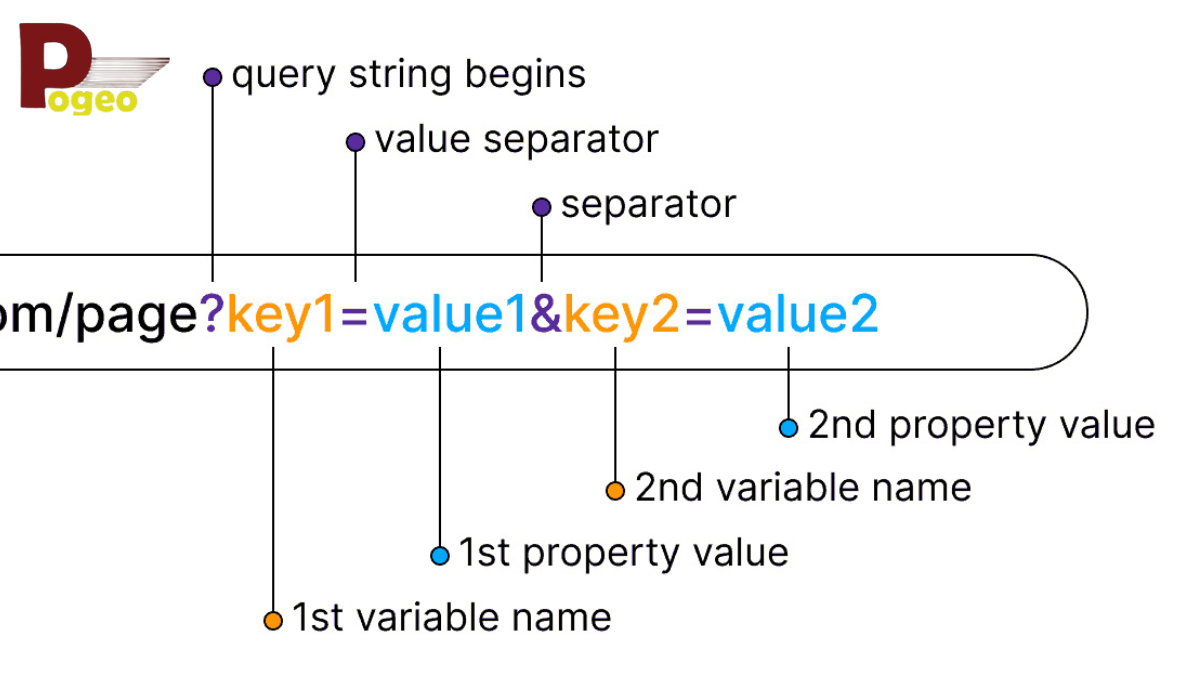
If you have ever clicked a link on a website and noticed a series of letters, numbers, and symbols after a question mark in the URL, you’ve encountered a query string. But what exactly is a query string, and why is it important in today’s web ecosystem? In this guide, we’ll explain everything about query strings, their uses, benefits, and best practices, helping you understand how they shape modern web experiences.
What Is a Query String?
A query string is a part of a URL that carries data to be passed to a web server. Typically, it appears after a question mark (?) in the URL and contains one or more key-value pairs separated by ampersands (&). These key-value pairs allow websites to send information dynamically, such as user preferences, search terms, or tracking parameters.
For example, a simple query string might look like this:
https://example.com/products?category=shoes&size=10
In this case, category=shoes and size=10 are key-value pairs. The server reads these values to display the relevant products, personalize the page, or track user behavior. Understanding what is a query string is essential for web developers, marketers, and anyone interested in website optimization.
Common Uses of Query Strings
Query strings are versatile and widely used in web development and online marketing. Here are the main purposes:
1. Filtering and Sorting Content
Many e-commerce websites use query strings to filter products. For instance:
https://example.com/shoes?brand=nike&color=black&price=100-200
This query string allows the website to dynamically display shoes by brand, color, and price range without creating multiple pages. It improves user experience and ensures the website remains organized.
2. Tracking Campaigns and Analytics
Marketers often add query strings to URLs to track campaigns. These are usually called UTM parameters:
https://example.com/?utm_source=facebook&utm_medium=cpc&utm_campaign=spring_sale
With these query strings, marketers can analyze traffic sources, ad performance, and user engagement. Knowing what is a query string in this context helps businesses optimize marketing strategies.
3. Personalization
Web applications use query strings to personalize content. For example, a news website might append a query string based on the user’s interests:
https://newsportal.com/?topic=technology
This ensures users see content tailored to their preferences without logging in or saving preferences manually.
How Query Strings Work in Programming
Query strings are widely used in programming to pass data between pages or applications. Here’s how they function in popular languages:
JavaScript
In JavaScript, you can read query strings using the URLSearchParams API:
const params = new URLSearchParams(window.location.search);
const category = params.get('category'); // "shoes"
const size = params.get('size'); // "10"
This allows developers to dynamically manipulate page content based on query string values.
PHP
PHP also provides a simple way to access query strings through the $_GET superglobal:
$category = $_GET['category']; // "shoes"
$size = $_GET['size']; // "10"
This is particularly useful for server-side processing, such as fetching database results based on user input.
Python (Flask Example)
In Python’s Flask framework, query strings can be accessed via the request.args object:
from flask import Flask, request

app = Flask(__name__)

@app.route('/products')
def products():
    category = request.args.get('category')
    size = request.args.get('size')
    return f"Category: {category}, Size: {size}"
Using query strings in programming allows developers to create dynamic, interactive, and personalized web applications.
Best Practices for Using Query Strings
While query strings are powerful, improper use can harm SEO, security, and user experience. Here are some best practices:
1. Keep URLs Clean
Long and cluttered query strings can confuse users and search engines. For example, avoid this:
https://example.com/products?category=shoes&size=10&sort=price_asc&ref=affiliate&utm_source=facebook&utm_medium=cpc&utm_campaign=spring_sale
Instead, organize and prioritize query parameters for clarity and usability.
2. Avoid Duplicate Content
Search engines may treat URLs with different query strings as duplicate content. Use canonical tags or parameter handling in Google Search Console to consolidate ranking signals.
3. Use Meaningful Parameter Names
Descriptive parameter names like category, price_range, or user_id are easier to read and maintain than generic names like a, b, or x.
4. Ensure Security
Never trust user input blindly. Always sanitize query string values to prevent security risks such as SQL injection or cross-site scripting (XSS).
5. Track Responsibly
When using query strings for tracking, avoid exposing sensitive information. Use unique IDs or hashed values instead of personal data.
Query Strings vs. URL Path Parameters
Query strings are often confused with URL path parameters. Here’s the difference:
| Feature | Query String | URL Path Parameter |
|---|---|---|
| Symbol | ? after URL | / in URL path |
| Format | Key-value pairs separated by & | Part of the URL path |
| Use Case | Filtering, tracking, personalization | Resource identification |
| Example | /products?category=shoes&size=10 | /products/shoes/10 |
Both have their uses, but query strings are more flexible for dynamic data, while path parameters are cleaner for hierarchical resources.
FAQs About Query Strings
What is a query string in simple terms?
A query string is a part of a URL that passes information to a server. It allows websites to provide dynamic content based on user input or tracking data.
Can query strings affect SEO?
Yes. If not managed properly, query strings can create duplicate content, confuse search engines, and dilute page authority. Use canonical tags, robots.txt, or parameter handling tools.
Are query strings safe?
Query strings are safe if used correctly. Always sanitize inputs and avoid sending sensitive information like passwords or personal data in URLs.
How do I read query strings?
Developers can read query strings using JavaScript (URLSearchParams), PHP ($_GET), Python (request.args), or similar methods in other frameworks.
Conclusion
Understanding what is a query string is crucial for anyone working with websites, applications, or digital marketing. Query strings allow dynamic content, personalized experiences, and effective tracking of user behavior. By following best practices, keeping URLs clean, and staying updated with modern web standards, you can harness the full potential of query strings while maintaining SEO, security, and usability.
As web technologies evolve in 2026, query strings remain a vital tool for creating responsive, data-driven, and user-friendly web experiences.
You may also read: Popular Games Available on SteamRIP